
Wondering how to share data on Glo? Whether you want to help a friend stay connected or keep your family online, Glo makes it simple. In this guide, you'll find two easy methods to share data on Glo, along with eligibility requirements and everything else you need to know.
Methods to Share Data on Glo
Method 1: USSD Code to Share Data on Glo
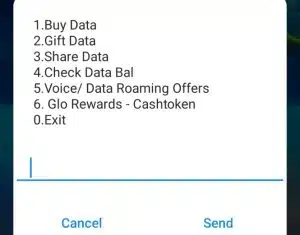
The correct USSD code to share data on Glo is *312# (you can also use *321#). Here are the steps:
1. Dial *312# on your Glo line
2. From the menu, select "Share Data"
3. Enter the recipient's Glo number
4. Select the amount of data you want to share
5. Confirm with your transfer PIN
6. Both you and the recipient will receive a confirmation SMS once the transfer is successful
Note: You can also add someone directly by dialling *127*00*[recipient's number] # or by sending "Share [recipient's number]" to 127.
Method 2: Share Data on Glo via Glo Cafe App
The second method is through the Glo Café app. Follow these steps:
1. Launch the Glo Café app and sign in with your Glo number
2. On the dashboard, navigate to the "Data" section
3. Select "Share Data" or "Gift Data" depending on your preference
4. Check your data balance first to avoid errors
5. Enter the recipient's Glo number and select the data amount
6. Confirm the transaction — the data will be deducted from your balance, and the recipient gets an SMS confirmation
Note: "Share Data" transfers from your existing data balance. "Gift Data" purchases a new bundle for someone else and deducts the cost from your airtime balance — these are two different actions.
Eligibility for Sharing Data on Glo
Before you can share data on Glo, make sure you meet these basic requirements set by Glo:
• Both the sender and recipient must be active Glo subscribers — cross-network sharing is not supported.
• You must have an active data plan on your line.
• Your current data plan must support sharing — some special or restricted plans are not eligible.
• Borrowed data cannot be shared. Data from Glo's Borrow Me service is strictly for the line that borrowed it.
• You must have a transfer PIN set up. The default PIN is 00000 — make sure to change it before your first transfer by dialling *312*00000*NewPIN*NewPIN#.
You can add a maximum of 5 Glo users to share your data.
What You Should Know Before Sharing Data on Glo
Once you've confirmed you're eligible, keep these practical tips in mind before going ahead:
• Always check your data balance first to make sure you have enough to share without leaving yourself short.
• Each transaction covers one recipient at a time — repeat the steps if you want to share with more people.
• The data you share carries the same expiry date as your original plan, so let the recipient know to use it before it expires.
• Sharing limits apply depending on your current Glo data plan — you can't always share your full balance.
• If a transfer fails, wait 10–15 minutes before trying again. Persistent issues should be reported to Glo customer care at 121, available 24/7.
Final Thoughts
Sharing data on Glo is straightforward once you know the right steps and codes. Whether you use *312# or the Glo Café app, keeping your loved ones connected takes just a few taps.
And if you ever find yourself low on airtime or data balance with no quick way to top up, Cardgoal has you covered. You can sell gift cards in Nigeria instantly on Cardgoal and use the funds to buy data or airtime right away — no delays, no stress. So the next time someone needs data urgently, you know exactly what to do.
FAQ's
1. What is Data Share on Glo?
Data Share on Glo is a service that lets you share your existing mobile data balance with other Glo subscribers, so friends or family can stay connected without buying a separate plan.
2. What is the USSD code to share data on Glo?
The correct USSD code is *312#. Dial it, select "Share Data," and follow the on-screen prompts.
3. Can I share data with multiple people at once on Glo?
You can share with up to 5 Glo users, but each transaction is done one at a time. Repeat the steps for each recipient.
4. Does shared data on Glo expire?
Yes. The shared data expires on the same date as your original plan, so the recipient needs to use it before then.
5. Can I share data if my balance is low?
You need sufficient data balance to share. If you're running low, top up first or use Cardgoal to buy data instantly.
6. What should I do if data sharing fails?
Wait 10–15 minutes and try again. If the problem continues, call Glo customer care at 121 — they're available 24/7.