
Running out of data at the wrong moment is something every Glo user wants to avoid. Knowing how to check your data balance on Glo keeps you in control of your usage and helps you stay connected without interruptions. In this guide, we cover three simple methods to check your Glo data balance, along with troubleshooting tips for common issues.
Why You Should Always Check Data Balance on Glo?
• Keeping track of your remaining balance prevents your data from running out in the middle of important tasks.
• It helps you plan and manage your data usage on a weekly or monthly basis.
• If you are sharing data with friends or family, monitoring your balance ensures you always know how much you have left.
• Many Glo data plans come with an expiry date. Checking your balance regularly ensures you use your data before it expires and get full value from your purchase.
Tip: You can use the Glo Data Calculator to get a monthly estimate of how much data you typically need.
Ways Check Data Balance on Glo
Here are the ways that you can use to check data balance on Glo!
Method 1: Check Glo Data Balance Using USSD Code
This is the fastest method and works without an internet connection.
1. Open the dialler on your Glo line
2. Dial *312# or *323# and press call
3. Follow the prompts displayed on your screen to view your remaining balance
Note: To check your YouTube Special data balance specifically, use *323#.
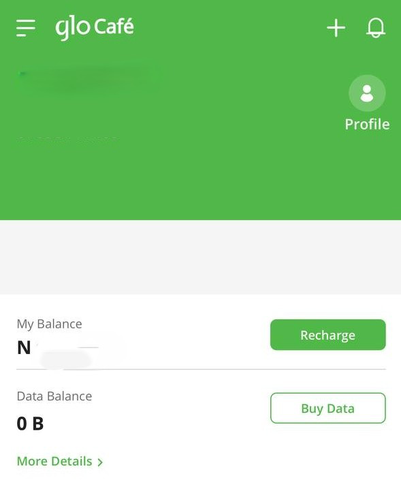
Method 2: Check Glo Data Balance via Glo Café App
1. Download and open the Glo Café App
2. Log in using your Glo number
3. Navigate to the "Profile" section
4. Your current data balance and plan details will be displayed there.
Method 3: Check Glo Data Balance via SMS
• Open your messaging app on your phone
• Type " info" and send an SMS to 312
• You'll get an SMS from Glo showing your current balance
Common Problems and Solutions While Checking Data Balance on Glo
USSD code is not working:
1. Restart your phone and try again
2, Remove your Glo SIM and reinsert it
3. Check your network signal strength — USSD codes require a stable mobile network, not Wi-Fi
Sent the code but received no response:
1. Toggle airplane mode on and off, then try again
2. Make sure your mobile network signal is active and stable
App shows zero balance, but you haven't used your data:
1. Log out of the Glo Café App
2. Clear the app cache on your phone and log back in
3. If the issue persists, try logging in from a different device
Conclusion
Checking your data balance on Glo is quick and straightforward across all three methods — USSD code, Glo Café App, or SMS. Staying on top of your balance means no unexpected disruptions and full value from every data plan you purchase. If you ever run out of data and need a fast way to top up, sell your unused gift cards on Cardgoal — the best app to sell gift cards in Nigeria — and use the funds to recharge your Glo line instantly.
FAQ's
1.How can I check my remaining Glo data balance?
You can check your Glo data balance by dialling *312# or *323#, sending "info" via SMS to 312, or through the Glo Café App after logging in with your Glo number.
2. What should I do if my USSD code isn't working?
Restart your phone, reinsert your Glo SIM, and ensure you have a strong mobile network signal before dialling the code again.
3. Why does my Glo Café App show zero balance even though I haven't used my data?
This is usually a cache or app glitch. Log out, clear the app cache, and log back in. If it persists, try accessing your account from a different device.
4. How often should I check my Glo data balance?
It is a good habit to check regularly — especially before important tasks, before sharing data with others, or as your bundle's expiry date approaches.
5. Can checking my balance help me manage my data better?
Absolutely. Knowing your remaining data helps you plan usage, avoid running out unexpectedly, and make sure you get the full value from your Glo data plan.