
If you are looking to subscribe Apple Music with MTN, you have come to the right place. Apple Music is a premium music streaming platform that gives you access to over 100 million songs, playlists, live radio shows, and exclusive content from artists worldwide. But for many people in Nigeria, subscribing to Apple Music is difficult because it typically requires a debit or credit card for payment. Not everyone in Nigeria has access to international cards.
MTN Nigeria offered a convenient solution to this problem in 2023. They introduced MTN Apple Music subscription where you can pay for your membership using your MTN airtime balance. This removed the need for a separate card. By subscribing through MTN, you not only get unrestricted access to millions of songs but also enjoy flexible payment options that suit your lifestyle. Now if you are wondering, how to subscribe to Apple music with MTN? We have got the answer. Let's start!
What is MTN Flexa? How it is Linked with MTN Apple Music Subscription
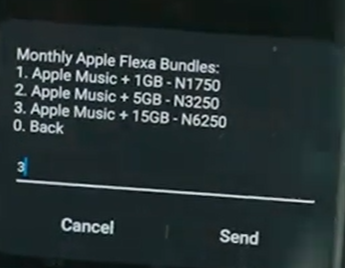
MTN Flexa is an all-in-one subscription plan that combines data and Apple Music subscription. Its a 30-day plan that allows users to enjoy unlimited access to Apple Music while also getting data for streaming, browsing, and everyday internet use. The 30 package plan with MTN Apple Music Subscription is mentioned below;
- Apple Music + 1 GB for ₦1750
- Apple Music + 5GB for ₦3250
- Apple Music + 15GB for ₦6250
What Is the Code To Subscribe Apple Music on MTN?
The code to subscribe to Apple Music on MTN is *305#. Using code for MTN Apple music is one of the most common methods that Nigerian people prefer. When you dial that code on your MTN line, you'll get the following option monthly Apple Flexa bundles. By using this code, you can have access to the packages for 30 days as shown in the image below.
Other Methods for Apple Music Subscription MTN
SMS Option
One of the simplest ways to subscribe is through SMS. All you need to do is send a text message with the word "MUSIC" to 8000 from your MTN line. Once the message is sent, MTN will process your request and activate the Apple Music subscription MTN linked to your number. You will receive a confirmation SMS when the subscription is successful, and the applicable charges will be deducted from your airtime or Flexa balance.
MyMTN NG App
You can also subscribe to the MTN Apple Music subscription using the official MyMTN NG App. After opening the app and logging in, navigate to the subscriptions or entertainment section, then select Apple Music.
From there, you can activate, manage, or cancel your subscription easily. The app also allows you to track your data usage, view subscription status, and manage payments all in one place.
Benefits of Subscribing Apple Music Using MTN
If you have planned to subscribe to Apple music using MTN, below are some benefits that you can enjoy;
1. You don't need a card for this subscription (no debit or credit card). You can pay directly using your MTN Airtime
2. There are different bundles and packages for this service. You can choose it according to your needs and budget.
3. The MTN Apple Music Subscription process is easy to manage, like using USSD coded or via MyMTN NG App.
4. This is a 30-day package, and it gives you uninterrupted access to Apple music for the whole month
5. Subscribing to Apple Music using MTN is an instant process as your services get activated quickly. You don't have to wait for the confirmation message for too long.
6. With this service, you can have access to millions of songs (over 100 million songs, playlists and live radio).
How to Renew Apple Music Subscription with MTN?
Follow these steps to renew Apple Music Subscription with MTN.
On your MTN line, dial the code *305# (It can be iOS or Android). From the displayed menu, you need to select the "Discover New Services" or "Active Services", then click on "Music". When you select this option. You can see another option, "Apple Music", on the screen. From there, you can select your package and confirm it. Your package will be activated instantly within minutes and you'll also get the confirmation message right away.
How to Cancel Apple Music Subscription with MTN
Here are the steps that you need to follow to cancel Apple Music subscription with MTN;
1. On your MTN line, dial the code *305# and click on send.
2. From the displayed option, find the option active services
3. Select the option "Cancel". You can tap on cancel and your active Apple Music subscription will end.
How to Buy Airtime Using Cardgoal for MTN Apple Music
If you don’t have enough airtime to purchase an MTN Flexa bundle, or if your MTN line is temporarily unavailable, the Cardgoal app provides a convenient alternative. With Cardgoal digital payment platform, you can sell your gift cards and quickly buy MTN airtime, which can then be used to activate or renew your Apple Music subscription. This ensures that your streaming experience remains uninterrupted, even if you’re facing temporary issues with your MTN line.
The process is simple and straightforward:
- Open the Cardgoal app and log in: First, access the app using your credentials. If you don’t have an account, you’ll need to create one.
- Go to "Pay Bills": On the home screen, you’ll find the option for "Pay Bills", which is where you can manage airtime and other services.
- Select "Buy Airtime": This will allow you to purchase airtime for your MTN line directly from the app.
- Choose your network provider: Select MTN from the list of available network providers.
- Enter your MTN phone number: Ensure you input the MTN correct number
- Select the airtime amount or package: Pick a package or amount that suits your needs. For Apple Music, make sure the airtime or data you buy covers the cost of the subscription.
- Confirm and complete the purchase: Once your payment is successful, the airtime or data will be credited to your MTN line almost instantly.
- After topping up, your MTN line will have sufficient balance to activate or renew your Apple Music subscription.
Conclusion
To conclude, subscribing to Apple Music with MTN is a convenient way to enjoy Apple music without needing a debit card. In this guide, we have mentioned different methods that you can use to activate the Apple music service with MTN, like using codes and MyMTN App. However, if you want to renew or cancel the subscription, we have also mentioned the process. If you don't have enough airtime to buy subscriptions, you can buy airtime using the Cardgoal app too.
FAQ's
- What is the Code for MTN Apple Music?
The code to subscribe to Apple music on MTN is *305#
2. How to Pay for Apple Music with MTN?
You can pay for Apple Music with MTN using Flexa bundles, USSD code *305#, SMS to 8000, the MyMTN app, the MTN Play portal, or by topping up airtime via Cardgoal.
3. How to renew Apple Music Subscription with MTN?
Dial the code *305#, find the option "Active services", then find option "Music". After that, tap on "Apple Music" and select your desired package.
4. How to cancel Apple Music Subscription with MTN?
Dial the code *305# > Active Services > Cancel > Click on Cancel > Get the confirmation message.